Commercial Interior Design
Commercial interior design was valued at approximately USD 137.93 billion in 2024 and is projected to reach USD 175.74 billion by 2030. That scale is why AI interior design is changing how commercial teams brief, visualize, and approve offices, cafés, and retail spaces.
A fit-out used to move at the speed of sketches, material samples, and manual revisions. Now a designer can turn a concept into something stakeholders can react to in minutes, then refine the interior redesign before anyone orders furniture or books contractors. That shift matters because commercial interiors are judged as business assets, not decoration.
The Growing Importance of Commercial Interior Design
A project manager walks into a client review with two problems. The tenant wants a faster opening, and the landlord wants a concept that looks persuasive enough to secure approval. In that moment, commercial interior design is doing more than shaping a room, it’s helping a business compete.
Commercial interiors now carry pressure from every direction. Offices need to support productivity, cafés need to drive dwell time and atmosphere, and retail spaces need to move people through merchandise with clarity. The broader interior-design market is large and expanding, while narrower commercial-service estimates show how segmented the field really is, from design services to construction-adjacent spending and furnishings.

Why speed now matters
The old bottleneck is easy to recognize. Teams wait for a mood board, then a revised plan, then a render, then another revision. Meanwhile, the lease clock keeps running, stakeholders lose patience, and the design team is stuck translating ideas instead of testing them.
AI interior design shortens that loop. It gives decision-makers something concrete to judge early, which is especially useful when the question is not “Do you like the style?” but “Will this layout win approval, support operations, and fit the brand?”
Practical rule: use AI for visual clarity first, then use human expertise for feasibility, compliance, and technical coordination.
That’s where tools like commercial interior redesign fit into a real workflow. They don’t replace concept design, but they do help teams move from abstract direction to a reviewable interior redesign faster, which is often the difference between a project that keeps moving and one that stalls.
Core Principles and Project Phases in Commercial Interior Design
Commercial interior design works when five priorities stay in balance, functionality, aesthetics, accessibility, sustainability, and brand alignment. Offices may lean toward efficiency and acoustic control, cafés toward atmosphere and circulation, and retail toward visibility and flow, but the same five principles still apply.
What each principle changes in practice
Functionality starts with how people use the space. In an office, that might mean separating focus work from collaboration zones. In a café, it means avoiding server bottlenecks. In retail, it means keeping high-demand categories visible without blocking movement.
Accessibility is not an afterthought. It affects route planning, furniture spacing, counter heights, and where people can pause, turn, and circulate. Sustainability matters too, but it needs to be tied to lifecycle decisions, not just finishes that photograph well. Brand alignment pulls the whole scheme together so the space feels intentional rather than generic.
How the project phases connect
The project flow usually begins with briefing and programming, then moves through design development, documentation, and implementation. That order matters because each stage creates constraints for the next one.
- Briefing: define users, operations, and limits before style decisions harden.
- Programming: map adjacencies, seating counts, and task types.
- Design development: test materials, lighting, and furniture combinations.
- Documentation and implementation: lock details down so the build team isn’t guessing.
AI is most useful in design development and early documentation, where fast interior redesign previews let a client react to alternatives without waiting for a full render set. A common mistake is to use visualization too early as a substitute for programming. That usually creates pretty schemes with weak operational logic.
The most reliable workflow is simple. Start with a clean brief, use AI to explore options visually, then have the design team verify circulation, structure, and spec details before anything is approved. If your process already includes a conventional design package, AI should sit beside it, not on top of it.
Regulatory and Accessibility Considerations
Compliance shapes commercial interiors before finishes do. In the United States, the 2010 ADA Standards require accessible routes to all dining areas in restaurants and cafeterias, including raised, sunken, and outdoor dining areas. That requirement affects the café plan, seating distribution, and where circulation can safely tighten.
The dimensions that actually matter
Accessibility is measurable, not decorative. An accessible route generally needs a minimum clear width of 36 inches, though it may narrow to 32 inches for a short distance at a doorway or between obstacles. For outdoor dining, 5% of fixed tables or at least one table must be accessible, and the tabletop should be 28 to 34 inches high with 30 by 48 inches of clear floor space for a forward approach.
Retail layout brings its own compliance pressure. The number of accessible checkout aisles depends on how many checkout aisles exist in total, with specific thresholds for 5 to 8, 9 to 15, and 16 or more aisles per the 2010 ADA Standards. A generated retail concept cannot be judged on appearance alone. It has to work against the store’s operating pattern.
Accessibility should be checked on the drawing, then checked again in the field. A polished render that misses route width or checkout circulation is still a failed concept.
AI interior design helps because it exposes those issues earlier in the workflow. A team can generate a café seating layout, review routes, then correct a counter or table arrangement before construction drawings are issued. That does not replace code verification, but it reduces the number of expensive revisions after the fact.
The safest approach is to treat AI visualizations as review material. Use them to test whether the concept can support compliance, then hand the final call to a qualified designer or code consultant. That keeps the speed of AI without confusing it with professional approval.
Material Selection, Budgeting, and ROI
Material choices in commercial interior design live on a timeline, not just a price list. A flooring finish that looks economical at purchase can become expensive if it wears badly under traffic, while a more durable finish can reduce replacement disruption and maintenance pressure over time.
A practical material comparison
| Material Type | Cost Range (USD/sq ft) | Typical Lifecycle |
| Commercial carpet tile | Varies by product and specification | Often replaced in sections, useful where acoustic control matters |
| Vinyl or LVT flooring | Varies by product and thickness | Common in high-traffic zones, chosen for cleanability and durability |
| Painted drywall or wall coating | Varies by paint system and prep level | Easier to refresh, but more dependent on maintenance and scuff resistance |
| Wood veneer panels | Varies by species and finish | Strong visual impact, needs careful maintenance in public areas |
| Upholstered seating | Varies by fabric and frame quality | Depends on wear, cleaning regime, and contract-grade specification |
AI can support this stage by showing how a material palette reads under different lighting and furniture combinations before procurement starts. That matters because a room can look expensive in one material mix and flat in another, even when the budget is similar. Visual testing helps the team avoid buying into a finish that only works in a render.
Budgeting also needs to account for maintenance and replacement cycles. A café chair that survives heavy turnover is more valuable than a more fragile option that looks stylish on day one. The same logic applies to office finishes that must tolerate cleaning, shifting occupancy, and frequent use.
Budgeting rule: spend first on the components that are hardest to replace, then on the finishes that most affect user perception.
The ROI argument is usually strongest when visualization shortens approvals. Faster sign-off means less redesign waste, less contractor downtime, and fewer late changes. In commercial interiors, that time saved often matters as much as the material cost itself.
AI-Driven Visualization Tools in Practice
A visualization tool has to do two jobs well. It must help stakeholders understand the proposal, and it must keep enough spatial truth for the design to feel believable. In commercial work, that balance matters because approvals depend on clarity as much as on presentation. Tools such as RoomStaging fit that need in workflows for virtual staging, interior redesign, image enhancement, and renovation previews.
How AI compares with traditional methods
Hand sketches move quickly, but they leave room for too much interpretation. Physical models can persuade, yet they take time and coordination. Basic 3D rendering software can deliver strong results, but it still asks for more setup and iteration than many client teams want before a meeting.
AI-generated concepts work differently. They can produce multiple office, café, or retail directions quickly, then let the team compare ambience, furniture density, and layout choices without restarting the process. That speed matters when a stakeholder wants to see one more option before sign-off.
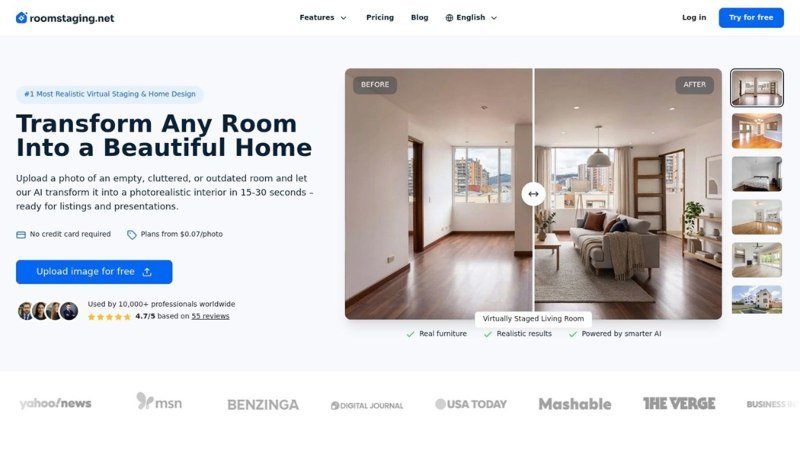
RoomStaging typically generates images in 15 to 30 seconds without queue-based delays, preserves original room geometry including windows and doors, and offers credits starting near $0.07 per image with full commercial licensing. Those capabilities matter because commercial teams need to move from concept to decision without losing the room’s actual proportions.
Where AI fits in the workflow
The strongest use case is not replacing the designer. It is helping the designer show the idea faster. That includes empty office suites that need virtual staging, cafés that need a warmer atmosphere, and retail shells that need circulation options explored before fit-out.
The design team still owns the substantive work, such as furniture specification, code checks, and sequencing. AI gives them more ways to make the conversation visual before the project becomes expensive.
Case Studies and Emerging Trends
A workplace team can use AI to present two versions of the same floor plate, one with a more open collaboration mix, another with stronger focus zoning. Clients usually respond faster to that than to a line drawing, because people judge spatial feel before they read dimension strings. The same applies when a café operator compares a quieter dining mood with a more energetic one.
What’s changing in real projects
Office projects often turn on stakeholder alignment. A landlord, tenant rep, and designer may agree on the brief but disagree on atmosphere, and a visual concept settles that discussion faster than another meeting.
Retail teams use AI to test circulation before joinery is committed. They can check product visibility, aisle logic, and checkout placement while the layout is still flexible. Cafés use it to compare seating density and spatial character without losing sight of the shell they have to work with.

Emerging trends to watch
One clear trend is tighter integration with BIM workflows, where visual concepts are no longer isolated presentation assets. Another is generative style exploration, which helps teams test materials and moods before detailed specification starts. AI-assisted compliance checking is also gaining traction, especially where accessibility and circulation need early review.
The strongest projects use visualization as evidence. They do not ask the render to justify the design alone, they use it to test whether the concept survives real-world scrutiny.
Scenario-based design is becoming more useful than single-image storytelling. Teams compare options, narrow the field, then validate the final direction with technical documents and on-site review. Commercial interiors are moving toward a model where the image is a decision tool, not just a marketing asset.
Common Misconceptions About AI Interior Design
The biggest misconception is that AI interior design replaces the designer. It doesn’t. It accelerates visualization, but it still needs human judgment for planning, accessibility, and material reality.
What AI does well, and what it doesn’t
AI is good at fast variation. It can show how an office might feel with different seating, how a café might read with warmer finishes, or how a retail shell might look with new merchandising logic. It’s much less reliable when a project depends on exact code interpretation, precise dimensional control, or product-specific specification.
Another common mistake is to trust a render because it looks polished. A polished image can still hide a circulation issue, overstate seat capacity, or ignore a practical service path. That’s why every generated concept still needs professional review.
The hybrid approach works best. Let AI handle repetitive visualization tasks and early optioning. Let the designer handle the work that requires judgment, negotiation, and accountability.
A lot of teams learn this the hard way when a concept that looked strong on screen proves awkward in use. The fix isn’t to abandon AI. The fix is to stop treating it like a final authority.
Next Steps for Commercial Interior Design Teams
Start with a simple pilot project, not a full rollout. An empty office suite, a café refresh, or a retail frontage concept is enough to test how AI visualization fits your team’s workflow.
Use a short checklist before choosing a tool:
- Workflow fit: can it support your existing briefing, review, and approval process?
- Output quality: do the images preserve geometry, scale, and room logic?
- Commercial use: does it support licensing for client presentations and marketing?
- Pricing model: is the cost predictable for repeated project use?
- Revision speed: can the team iterate without losing momentum?
If a tool passes those tests, it can become a useful part of the design process instead of a novelty. The value lies in making commercial interior design faster to explain, easier to approve, and simpler to refine before the build starts.